
Quote and Contract Approvals
This guide explains how Quote and Contract Approvals work and how to set them up for your Station Group.
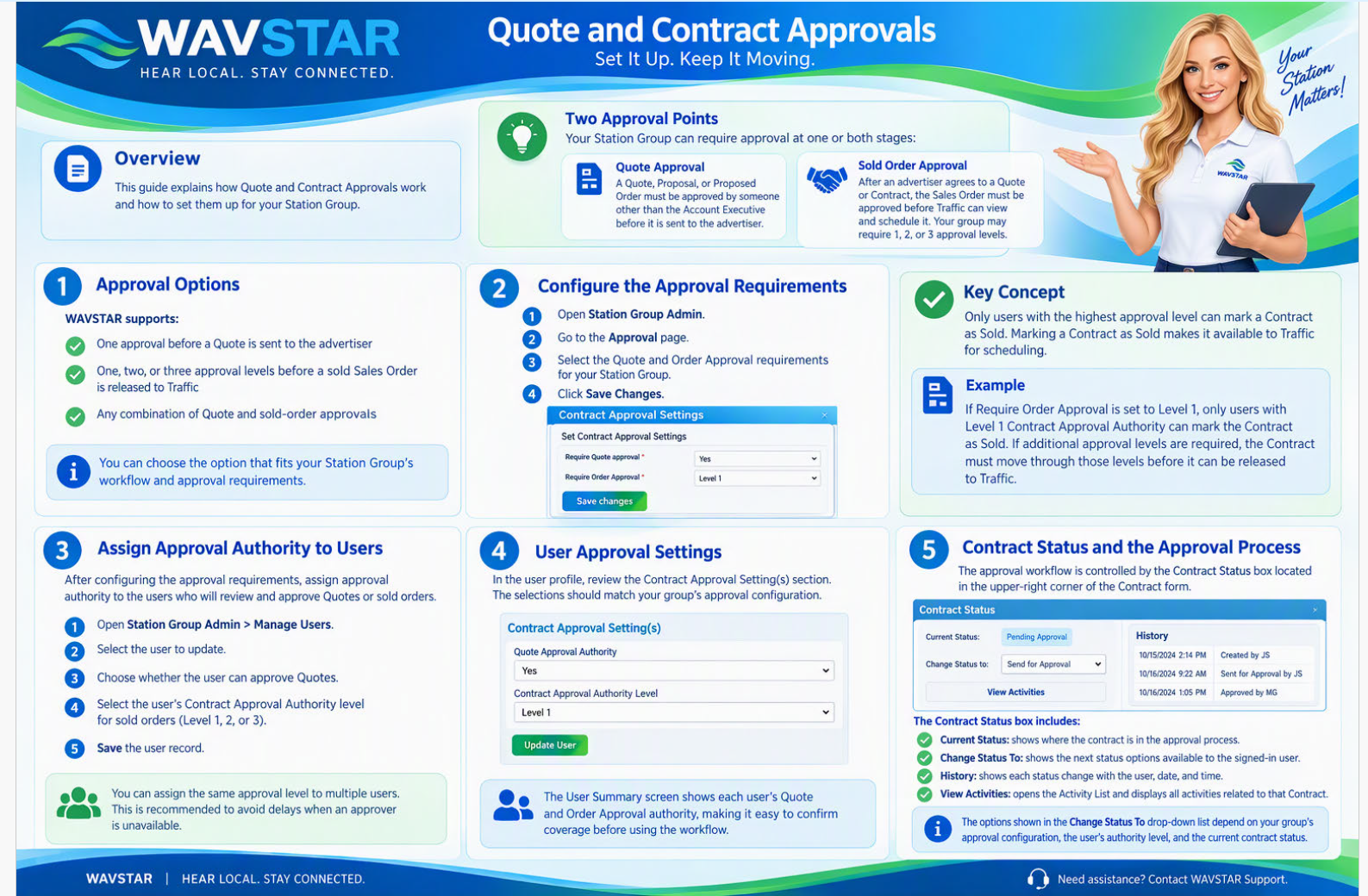
Approval Options
Your Station Group can require approval at two different stages:
Quote Approval
A Quote, Proposal, or Proposed Order must be approved by someone other than the Account Executive before it is sent to the advertiser.
Sold Order Approval
After an advertiser agrees to a Quote or Contract, the resulting Sales Order must be approved before Traffic can view and schedule it.
Depending on your Station Group’s requirements, a sold order may require one, two, or three approval levels.
Available Approval Settings
WAVSTAR supports:
- One approval before a Quote is sent to the advertiser
- One, two, or three approval levels before a “sold” Sales Order is released to Traffic
- Any combination of Quote and sold-order approvals
Setting Up Contract Approvals
Complete the following two steps to set up the approval process for your Station Group.
Step 1: Configure the Approval Requirements
- Open Station Group Admin.
- Go to the Approval page.
- Select the Quote and Order Approval requirements for your Station Group.
- Save your changes.
Important: Only users with the required highest approval level can mark a Contract as Sold. Marking a Contract as Sold makes it available to Traffic for scheduling.
Example
If Require Order Approval is set to Level 1, only users with Level 1 Contract Approval Authority can mark the Contract as Sold.
If additional approval levels are required, the Contract must move through those approval levels before it can be released to Traffic.
Step 2: Assign Approval Authority to Users
Assign approval authority to the users who review and approve Quotes or sold orders.
For each authorized user, identify whether the user can:
- Approve Quotes before they are sent to advertisers
- Approve the sold orders
- Provide Level 1, Level 2, or Level 3 Contract Approval, based on your Station Group’s configuration
You can assign the same approval level to more than one user. Assigning multiple users at each required level is recommended because it helps prevent delays when an assigned approver is unavailable.
The User Summary screen displays each user’s Quote and Order Approval authority.
Once the approval requirements and user authority levels are configured, your Station Group can begin using the approval process.
How the Approval Process Works
The approval workflow is controlled by the Contract Status box located in the upper-right corner of the Contract form.
The Contract Status box contains four important items:
- Current Status: Displays the Contract’s current position in the approval process.
- Change Status To: Displays the next status options available to the signed-in user.
- History: Shows each status change, including the user, date, and time.
- View Activities: Opens the Activity List and displays all activities associated with that Contract.
The options shown in the Change Status To drop-down list depend on:
- The Station Group’s approval configuration
- The approval authority assigned to the signed-in user
- The Contract’s current position in the approval process
Users will only see the status options they are authorized to select.